ClioSport.net

This is a sample guest message. Register a free account today to become a member! Once signed in, you'll be able to participate on this site by adding your own topics and posts, as well as connect with other members through your own private inbox!


  • When you purchase through links on our site, we may earn an affiliate commission. Read more here.

Excel quicky

no luck tbh its only talking about values and not words.

Is there not a dropdown where you can select specific text? I've not got Excel at work so can't look myself.

EDIT: Ah actually, thinking about it, that's on Excel 2007.....
 
Last edited:
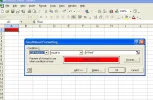
this works for me:

28wgw8x.webp


it's pretty similar in pre-office 2007 iirc
 
a few people are confused i need the cell to turn red not the word? i have tried all that but it was doing silly things like....when i type red it stays normal but when i click ot of the box it changes to red? also clicking "equals to" and "red" wont work for me
 
lewis... follow the above pic that ian has shown you... but click the format tab button then click on the patterns tab. click the red colour... change your font to a colour of your choice. it will work
 
Make sure the word Red is in quotation marks: "Red" in the conditional formatting box
 

Attachments

  • Clipboard02.webp
    Clipboard02.webp
    31.6 KB · Views: 71
Back
Top