Hi Everyone! How are you all today?
Can anyone tell me why my f**king PC is doing this s**t -
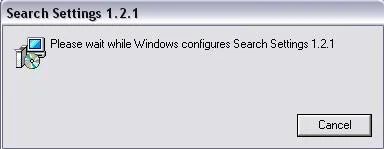
http://s27.photobucket.com/albums/c189/subway172cup/?action=view¤t=bulls**t.jpg
I was obviously barking up the wrong tree when trying to clean out the PC and now everytime I open inters**t explorer this box comes up.
Now the trick is, is to press cancel loads of times then it loads up fine. If you dont, it will go on to this other box, almost like a search box and it trys to find settings for something? I would show you that box, but i'm downloading itunes and if this search box comes up every internet box closes down! so f**king frustrating...
Anyone know what this is?
Free Beer at Trax if anyone can help!
Thanks,
AJ
ROLLO - cheers matey!
Can anyone tell me why my f**king PC is doing this s**t -
http://s27.photobucket.com/albums/c189/subway172cup/?action=view¤t=bulls**t.jpg
I was obviously barking up the wrong tree when trying to clean out the PC and now everytime I open inters**t explorer this box comes up.
Now the trick is, is to press cancel loads of times then it loads up fine. If you dont, it will go on to this other box, almost like a search box and it trys to find settings for something? I would show you that box, but i'm downloading itunes and if this search box comes up every internet box closes down! so f**king frustrating...
Anyone know what this is?
Free Beer at Trax if anyone can help!
Thanks,
AJ
ROLLO - cheers matey!
Last edited:





 If it's this it means that you've done something so the PC thinks the software should be installed/isn't installed correctly and it's trying to fire up the installer to fix it.