
ClioSport.net

This is a sample guest message. Register a free account today to become a member! Once signed in, you'll be able to participate on this site by adding your own topics and posts, as well as connect with other members through your own private inbox!

  • When you purchase through links on our site, we may earn an affiliate commission. Read more here.

computer geek help please...laptop to tv, is it possible?

Car  182
hi, i know this can be done but not sure if my laptop needs to have a hdmi port as it doesnt, is there an other way of doing this?
 
vga if your tv has one (which it most likely will have) or even a usb - av cable will work
 
You just need a VGA lead ( the same that comes with any regular monitor ) the main question with that solution though is does your TV have a VGA port? I'd say it's fairly unlikely it will
 
What TV are you hooking up to? Also do you want audio out through the TV as well? As that is where it gets more difficult in general depending on the TV and if you do or do not have a separate surround type system you can plug into.
 
You just need a VGA lead ( the same that comes with any regular monitor ) the main question with that solution though is does your TV have a VGA port? I'd say it's fairly unlikely it will

how would i know that mate? its a 40" samsung if that helps lol
 
What TV are you hooking up to? Also do you want audio out through the TV as well? As that is where it gets more difficult in general depending on the TV and if you do or do not have a separate surround type system you can plug into.
a samsung mate, my mams new laptop hooks up straight away through a hdmi but my laptop being a few years old doesnt have a hdmi port on it
not bothered about sound no, just internet on the big screen basically lol
 
Have a look round the back of the TV for a port that looks like this:

connect-vga-port-tv-200X200.webp
 
I connect to my tv this way, I used to do it for iPlayer before I got the ps3.

I used the VGA cable for the picture, then ran a cable from the headphone output on my laptop to the aux sound in on the tv. Sounds a bit of a PITA but it was really only 2 wires.
 
I connect to my tv this way, I used to do it for iPlayer before I got the ps3.

I used the VGA cable for the picture, then ran a cable from the headphone output on my laptop to the aux sound in on the tv. Sounds a bit of a PITA but it was really only 2 wires.

Used to do the same before iPlayer came to Freesat. My panasonic had both these inputs on the side so was easy to just whip the cables in and out when needed.
 
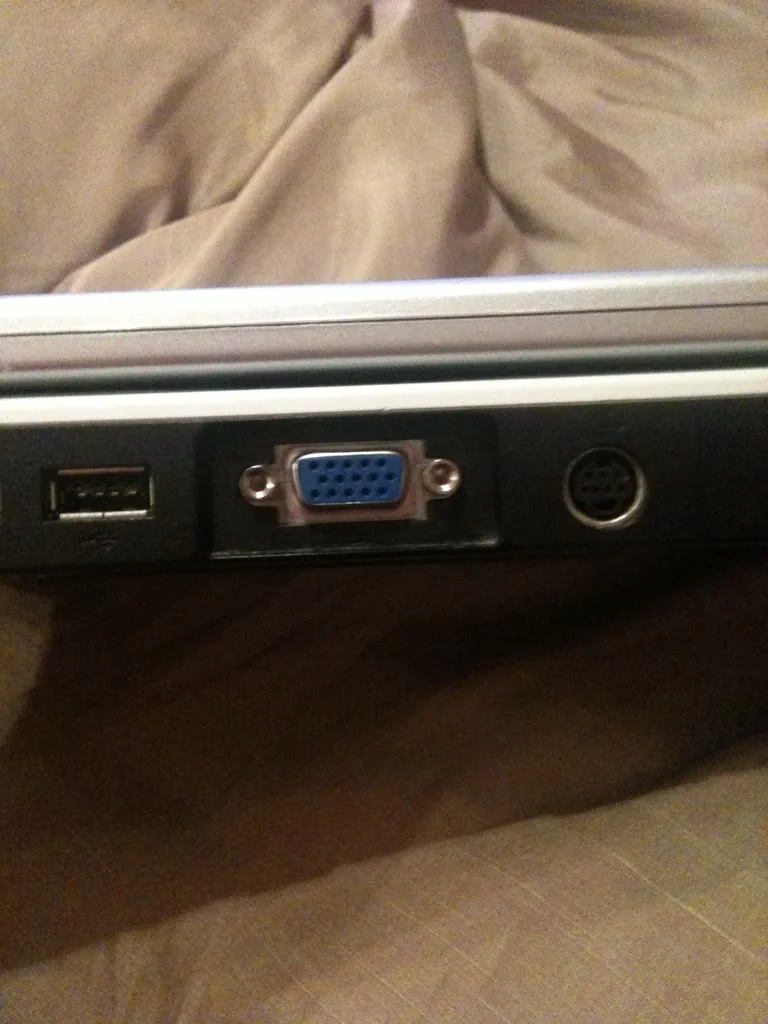
Is this what you mean on the back of my laptop?
bd061e85.webp

So do i need a cable from the blue port, to the same kind of port on my tv...on ebay ther are vga port cables with hdmi on the end, could i get one of those cables and conect the hdmi end to the tv?
 
Is this what you mean on the back of my laptop?
bd061e85.webp

So do i need a cable from the blue port, to the same kind of port on my tv...on ebay ther are vga port cables with hdmi on the end, could i get one of those cables and conect the hdmi end to the tv?

yes
 
Me again lol
Is there a difference between;
Laptop vga to tele vga
Laptop vga to tele hdmi
Will they do the same thing? My tele has the hdmi port on the side so would ve easier than getting to the vga port as thats on the back of the tele.(my tele is fixed on the wall)
Thanks again
 
I would go for VGA to HDMI.

This!

I got a vga-hdmi dongle thing cheap off of ebay, then use a regular hdmi cable to attach my media pc to the tv. Works flawlessly, and picture is definitely sharper than it was on vga - vga, but that could just be my tv
 
Cheers! On ebay i was reading the description and it said something about a convertor is needed!? Maybe im getting it confused though...?
Nice pic of ur car next to mine in June btw Mike ;)
 
you will also need an analogue to digital converter as vga is well... analogue (which is about £40 on top) :) unless your video card supports digital signal output through VGA port. Which is why i recommended a vga to vga cable.
 
Last edited:
I think i sound thick here but im confused still lol
Ok so, the vga to vga cable will work on its own and i wont need to buy anything else
But the vga to hdmi cable wouldnt work on its own?
 
Back
Top