ClioSport.net

This is a sample guest message. Register a free account today to become a member! Once signed in, you'll be able to participate on this site by adding your own topics and posts, as well as connect with other members through your own private inbox!

  • When you purchase through links on our site, we may earn an affiliate commission. Read more here.

Pc issue

Ffs.

Turned computer off. Turned it back on and now nothing is coming up on monitor, tried different monitor.

WTF any sugestions?
 
Is it beeping when first switched on? If so, the sequence of beeps will lead you to a fault code.
 
I assume you plugged the power on the monitor in? lol

did you use the same power lead to connect the other monitor?

Check fuses / try different plug sockets.

if not these and you're sure the monitor works - remove and reseat the graphics card.

if this doesn't work new graphics card.
 
if the graphics card had failed in anyway you'd expect beeps from the motherboard, so it does suggest that its something to do with the monitor video/power cable or fuse)
 
any failure with the computer itself should cause the motherboard to beep, if its not beeping at all it does suggest the computer itself is fine.
 
how old is the PC? its strange it is not beeping at all.

I'd try taking the graphics card out (unless its onboard) and reseating, although as said you should be hearing beeps if its at fault.
 
4 years.

Taken ggraphics out and memory. Given it the old blow trick then tried on different monitor. Hmm.

Could try different memory/ graphics card?
 
Not monitor for sure, just use the monitor on different pc. Nor is it gfx card, just used different one. Tried different ram too. Nothing.
 
didn't expect it to work, as said if the computer was unhappy about any of the components it should beep. Can you hear the HDDs spinning up and being accessed?
 
tried removing the BIOS battery, powering on/off, replacing the battery and powering on? (or just clearing the BIOS with the jumper if it has one/you know where it is?)
 
it looks like a watch battery on the main board (motherboard) itself. You should be able to lever it out, turn the PC on, leave it a while, then turn off. Replace the battery and power back on, that'll clear the BIOS and return it to its default settings, may resolve the unknown issue. (Its worth a try anyway)
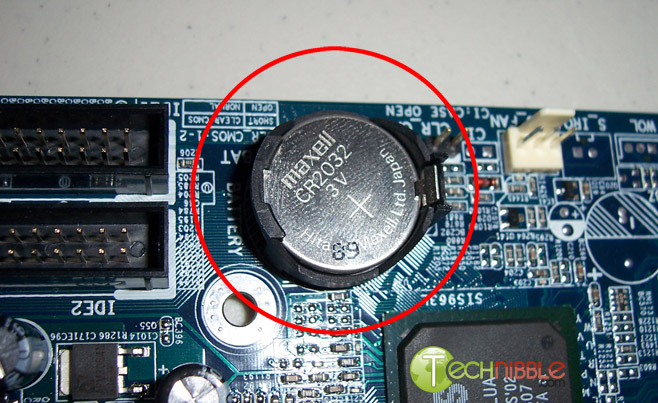
remove-battery.jpg


Does the PC have an internal speaker on the case? Is it connected to the motherboard?

internal%20spear%20(2).jpg
 
tried changing the memory? I'd strip it down as much as you can, i.e change the graphics card, change the memory (only use one DIMM) remove any other cards, disconnect CD/HDDs etc
 
I'd say the motherboard itself has gone. When it was working it should have been giving a single beep to say it was ok, now its not beeping AT ALL suggests its a fundamental problem with the motherboard.
 
I've got a psu that will work. I've broken it down now. Will rebuild it later with different parts bar the motherboard to see. What a pitta. Not what i need.
 
Back
Top