ClioSport.net

Register a free account today to become a member!
Once signed in, you'll be able to participate on this site by adding your own topics and posts, as well as connect with other members through your own private inbox!

  • Due to ongoing maintenance work some features and functions (including Dark mode!) may be unavailable or visually appear differently.
  • When you purchase through links on our site, we may earn an affiliate commission. Read more here.

Urgent PC Help!!

Car  Megane DCi 147bhp/350nwm
Fitted a new power supply to another PC...when i plug power in the lights flash on the pc then go off. I press the power button and nothing happens


I can unplug it and plug it back in and it will just do the same.

If i turn it off at wall and plug it in the turn plug on it does it again.

Is the power supply setup wrong!?

Can someone suggest the problem please! many thanks, ben

 
Sounds like you dont have the atx power supply plug connected to the correct pins on the mobo..

You can test it by shorting the two pins on the mobo manually (the ones that say power switch or simmilar)
 
Sure you've plugged everything in right? In particular the small 4 pin connector that goes near the CPU, thats a easy one to miss.
 
dscf05302mw.jpg
 
Un-plug everything, hard drive, cd rom etc, then try powering up, may be overloading the PSU.
 
have you got the wires that go to and from the switch and reset button in the right order? i did them in the wrong order once and that happened what you are describing. lights just flashed then died when powered up.
 
i do but i dotn want to rip another PC about
its a brand new PSU though!!

its crazy!! there is obviously power going to everything but i dont know why it just shuts off!
 
have you got the wires that go to and from the switch and reset button in the right order? i did them in the wrong order once and that happened what you are describing. lights just flashed then died when powered up.


??

I can't even press the button on the front, as soon as i plug the power in the back it does it!
 
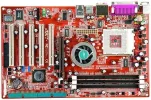
Sorted.... the 4 ping plug that's tied to the ATX power needs to go in a pulg at the top left-hand side of the cpu, noted in the green box

Ignore that, the 4 pins I can see are for the 20/24 Pin ATX adapter plug :-(
 

Attachments

  • kv7_lg.webp
    kv7_lg.webp
    77.6 KB · Views: 81
I havent touched the leads that go to the front switches either... heres a picture!
 
That looks fine... I did have some PSU probelms when using on an AMD machine, the PSU worked fine in my Intel..
 
Thinking about it, I did have one pc that when unplugged from the mains then plugged back in, experienced the same symptons, after a few minutes the pc would power up.
 
If your sure that you have everything wired up correctly then it is possible that you got a duff PSU, worth testing in another machine before you take it back though.
 
Back
Top