ClioSport.net

This is a sample guest message. Register a free account today to become a member! Once signed in, you'll be able to participate on this site by adding your own topics and posts, as well as connect with other members through your own private inbox!

  • When you purchase through links on our site, we may earn an affiliate commission. Read more here.

Home Coding/Software Projects

Here is the finalised version of the video I already posted (so you don't really need to see it again!) :ROFLMAO: I just tarted it up with an intro and some captions. More professional, innit. Debatable.


A few more updates on "Project: OPFRAME"...

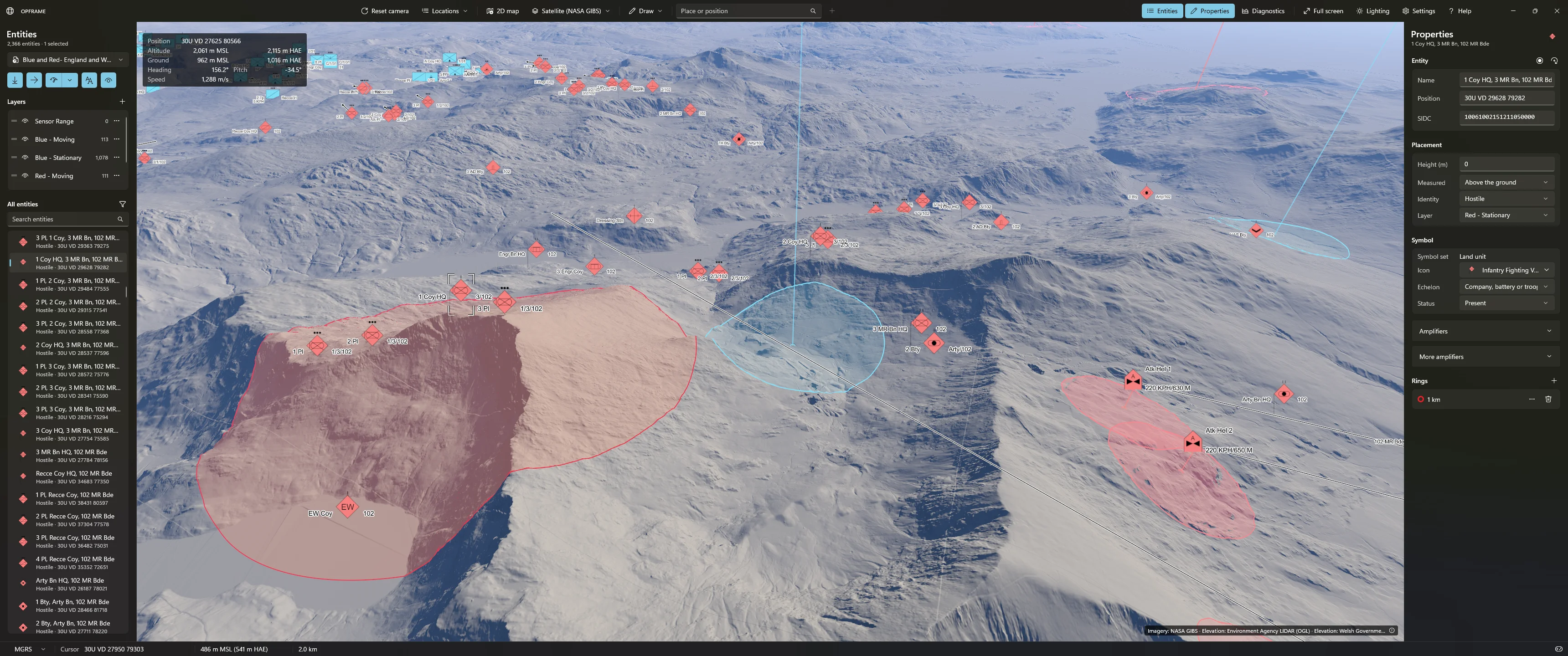
I have refined the UI (and will continue to do so as more features are added). For example, "Layers" are now available. This means that symbols, overlays, etc. can be placed on different layers on top of the map/terrain and be enabled or disabled, or their rendering order changed. The rendering system implemented this layered behaviour already but I hadn't wired it through to the UI.

There is also a full search and filter capability for entities now, too; although this is not shown in any of the screenshots.
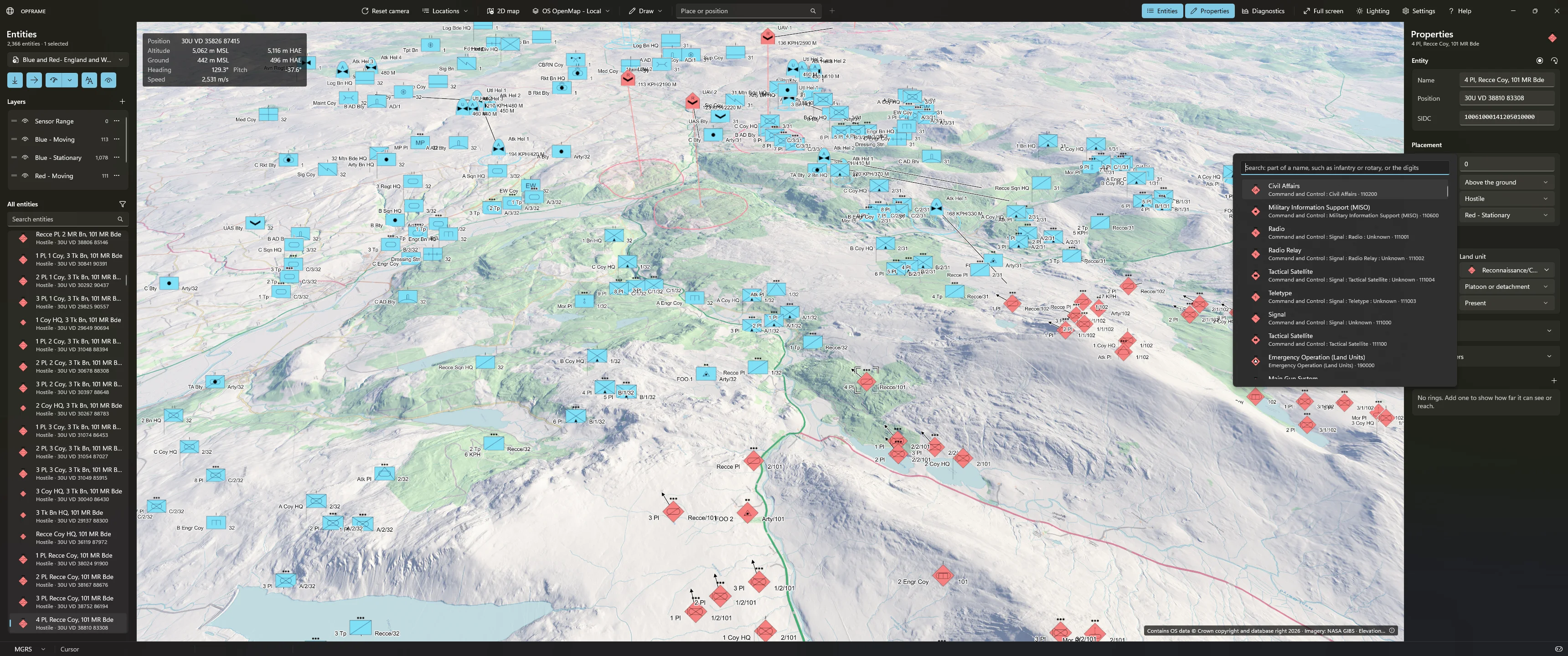
Desktop Screenshot 2026.10.10 - 23.49.30.27.webp


I have also added a search capability that allows the user to immediately jump to a known/named place. This is limited to the UK for now but the mechanism can be extended globally. There are approximately 50,000 UK geolocated places in this prototype - city names, towns, roads, that sort of thing. It is just a database of names and locations so easily extendable.
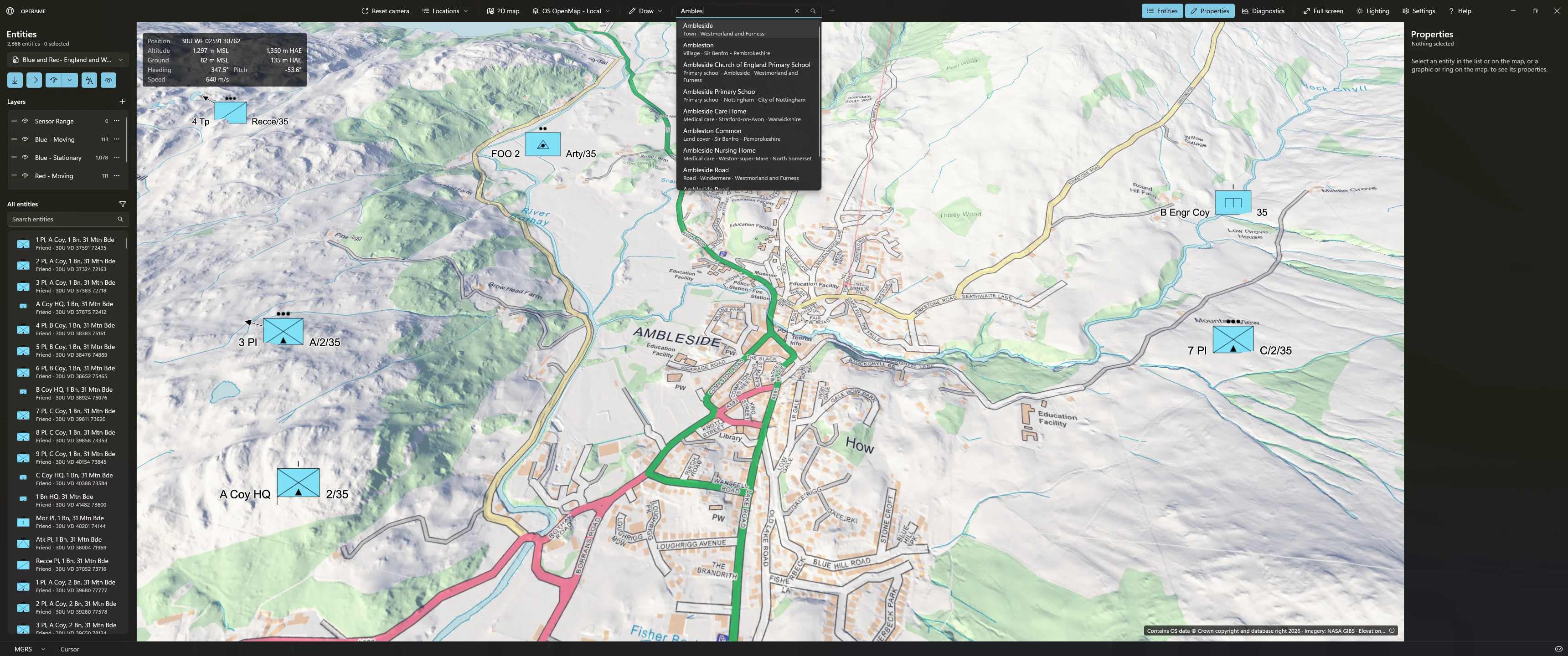
Desktop Screenshot 2026.10.11 - 00.07.33.26.webp


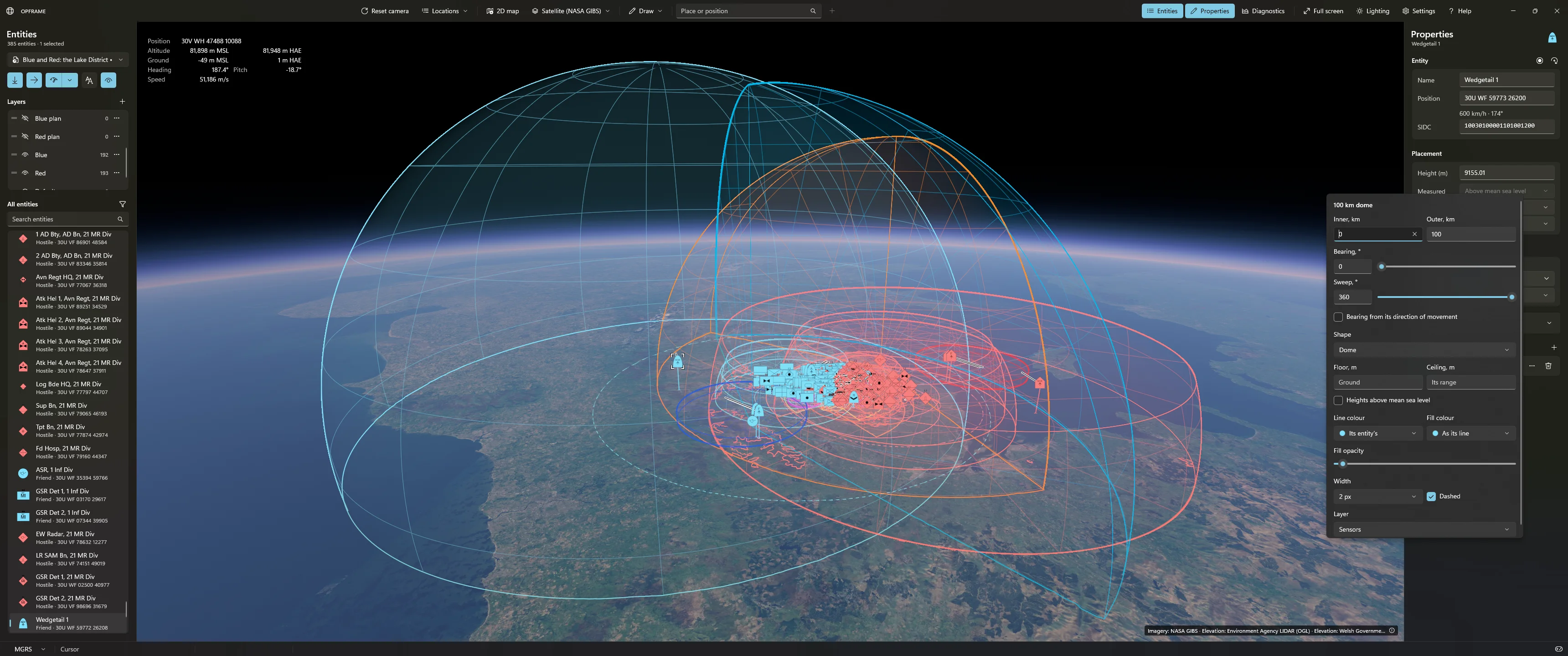
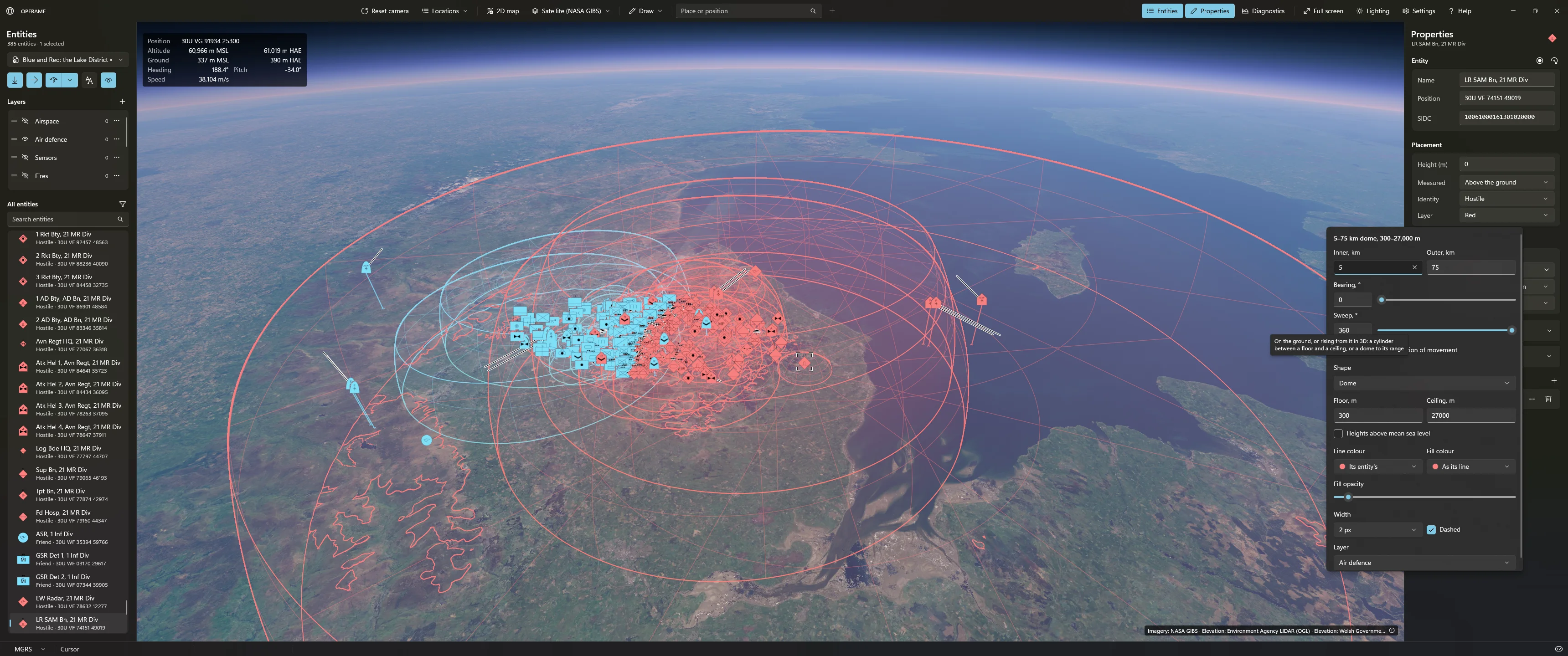
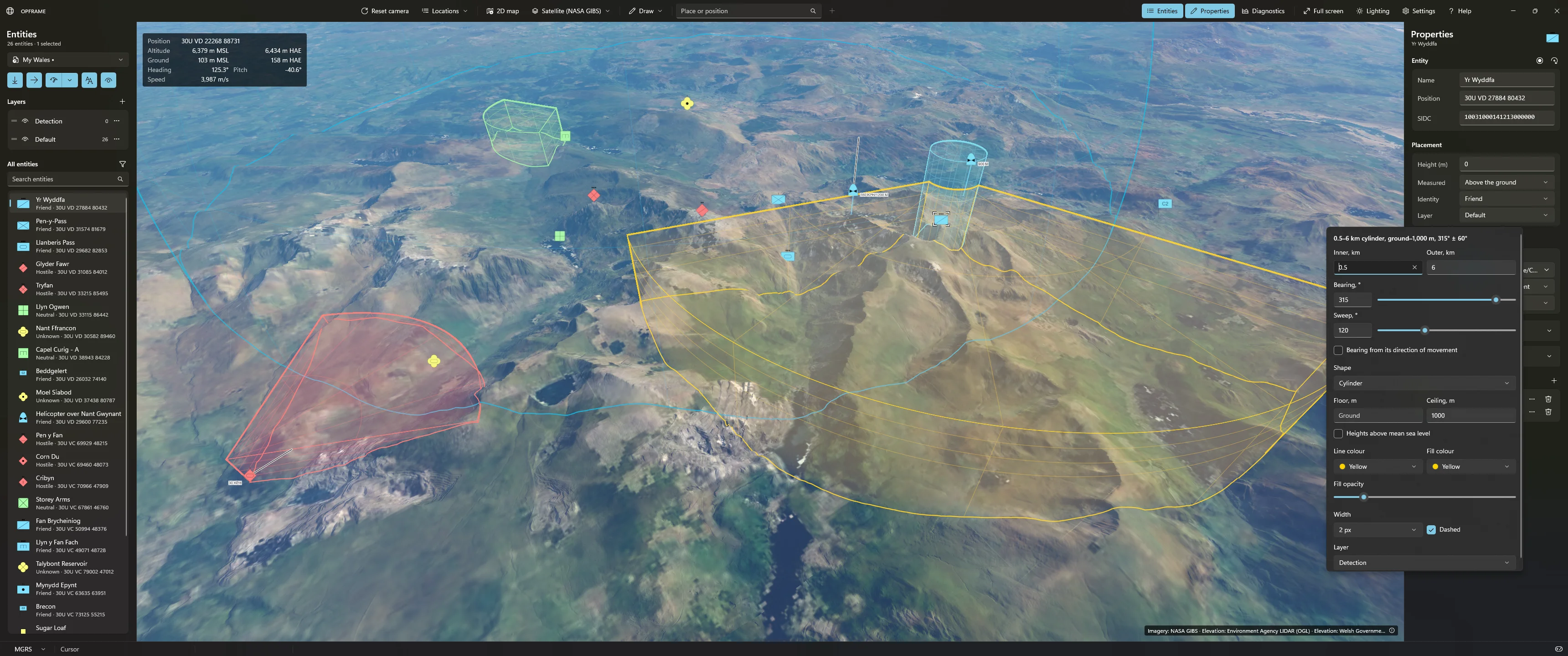
Overlay support has been added - although restricted to rings, cylinders and domes at present (representing things like sensor range, operational ceilings, etc,) with bearing and sweep modifiers. User created tactical overlays are to follow soon. Overlays can exist on different layers and, depending on their type, can drape over the underlying map/terrain or show their 3D boundaries.
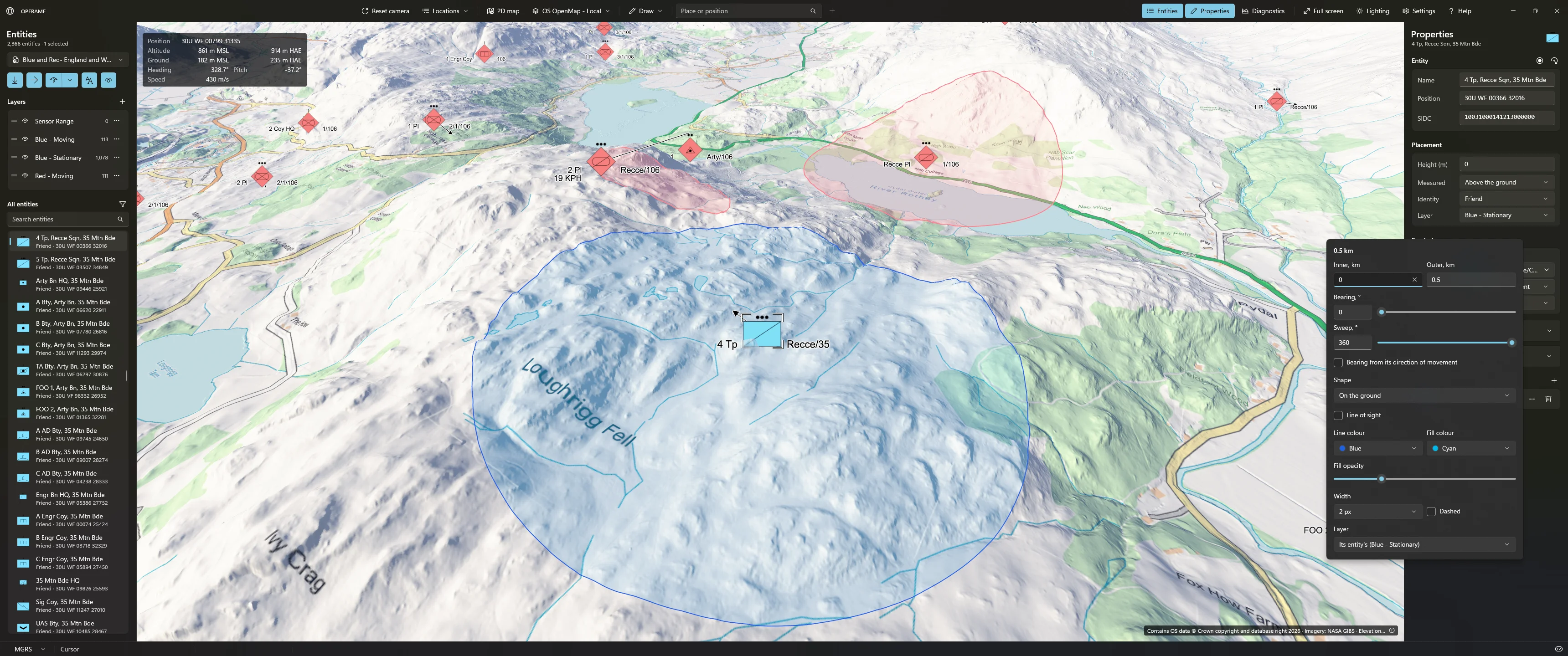
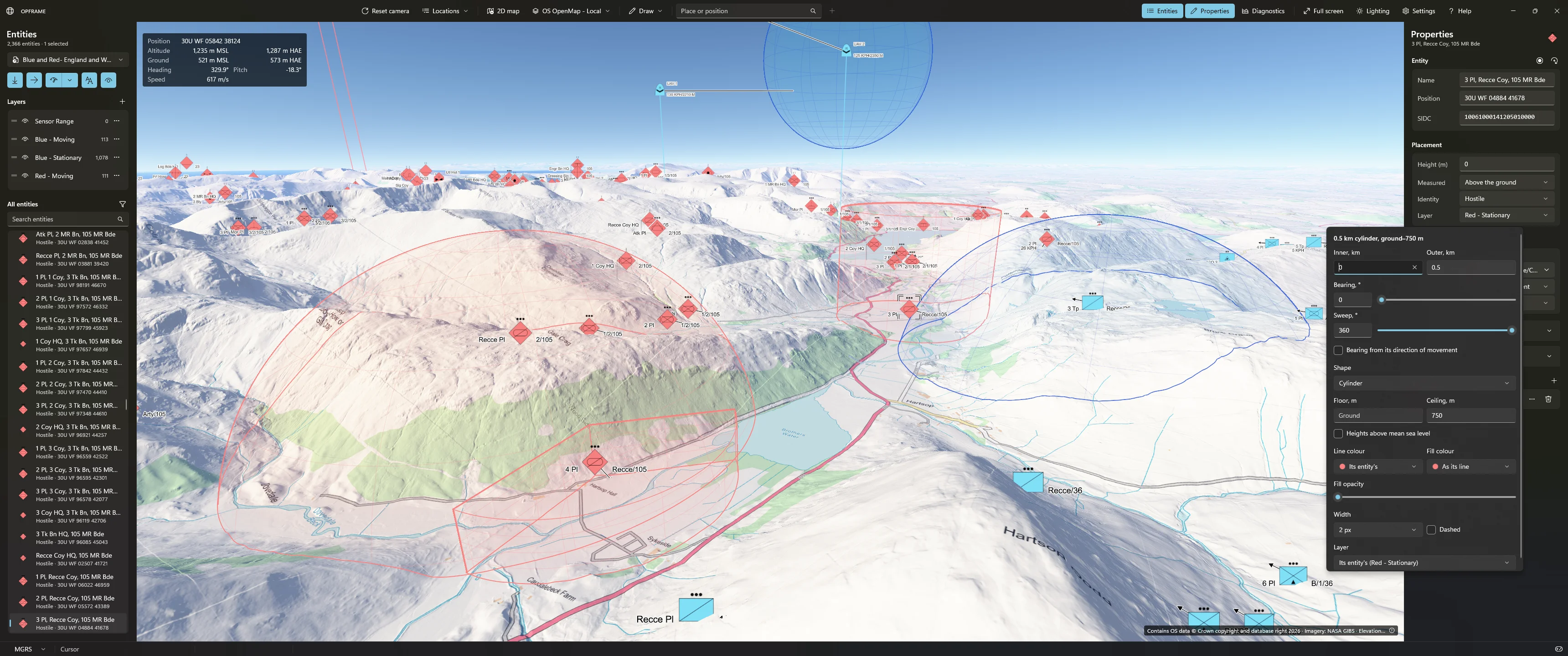
Desktop Screenshot 2026.10.12 - 01.46.44.31.webp

Desktop Screenshot 2026.10.12 - 01.54.05.72.webp


Or a bit further out...

Desktop Screenshot 2026.10.12 - 02.25.57.89.webp

Desktop Screenshot 2026.10.12 - 02.27.15.70.webp


And closer again... :ROFLMAO:

Desktop Screenshot 2026.10.12 - 02.30.46.36.webp

Desktop Screenshot 2026.10.12 - 02.40.18.31.webp


They look a lot more impressive in action than in static screenshots as they all move/adapt in real-time and are fully editable.

I'm currently working on a line-of-sight feature, entity laydown, improved editing capabilities, undo/redo, and have lots of other things planned too. This could turn into quite a project actually. 🫣
 
Someone on a programming group asked about how the rendering of the terrain system worked so I am adding it here, too. You can skip if you aren't interested in this shizzle! :ROFLMAO:

Foreword:
The maps I use are free public domain sources with license to use with accreditation. Public domain limits the quality and fidelity although there are a few good sources. For example, my UK home is well covered hence I am using ~1.5m per pixel resolution height data and ~1m per pixel street level mapping (based on a vector source). My system supports any fidelity and is only limited by storage space and data availability. What I haven't spoken about is the map processing side of this project. I have scripts that fetch the map (imagery and elevation data) and written C++ libs to build the optimised data set that my terrain system consumes.

How it works at a high level...​

The system I use is loosely based on a so-called "tile key" method whereby the globe is split across layers and tiles, and these keys index into (ideally fast) local storage for streaming in of assets on demand. It is not too dissimilar to how an online based server would serve up map tiles. I will try and break it down and - hopefully - it won't become a technical essay.

Both map imagery and elevation data use the same addressing method, based on Web Mercator (EPSG:3857) XYZ tiles. Web Mercator (EPSG:3857) is a coordinate reference system that represents locations on the curved surface of the Earth as coordinates on a flat, two-dimensional map. It is the projection used by many popular online mapping services, including Google Maps, OpenStreetMap-based maps and Bing Maps. When working with digital elevation models (DEMs), satellite imagery, GIS data or terrain rendering, EPSG:3857 is a format that pops up all the time, hence my decision to use it for this project. Of course, I can always re-project or convert into other reference and coordinate systems as well if I choose, but this is my data base alignment (for want of a better term).

A tile key is { level, x, y } where y is counted from the north, and that indexes a specific square of ground (sometimes "level" is referred to as "z"). Each level splits every tile into four; resulting in a quadtree pyramid structure. I then have a dedicated map geo library that handles the projection and conversion that maps tile to real-world ground location. This means I can represent/present the map as 2D or 3D through my renderer back end. Sitting on top of this quadtree pyramid (well, integrated as part of it) I have a layering capability so that I can have multiple sources of data for the same locations on the Earth. I can then set the layer priority to choose what I want displayed at a given level. So, for example, I could have a very coarse globe-wide elevation data set that takes up little storage and works fine for views from outer space, but then have localised data sets with sub-metre accuracy for zooming in to street level or further. Elsewhere, the coarse data is used. As you can imagine, storage requirements can escalate rapidly! (I won't go into the details of data formats as it can get a bit tedious or uninteresting!)

When it comes to selecting a tile (per rendered frame), the quadtree is walked from the source's root tiles. It refines a tile while one of its texels (or height samples) would cover more than a pixel at that tile's nearest point to the camera. That is what gives the "LOD" (mixed levels) at render time; finer and higher fidelity near and under the camera, becoming coarser towards the horizon. I will put a video together showing this in action. Tiles are culled against the frustum and the horizon using bounding boxes that allow for the Earth's curvature and for each tile's height range. The walk also selects a prefetch margin, a wider frustum in 3D or a wider rectangle in 2D. These margin tiles are loaded but never drawn, so turning the camera finds them ready to go. The result is purely geometric - it lists the tiles to draw and the tiles wanted. The wanted list is ordered with the view's tiles before the margin's, coarse levels before fine, and near before far. Ancestors are wanted too, because they are the fallback assets presented while their (higher fidelity) children load, if applicable.

In terms of streaming - for each wanted tile:
  • A tile loader reads the bytes on worker threads into a byte-budgeted LRU (least recently used) tile cache. Missing and unreadable tiles are remembered so that the system doesn't continually try to stream broken, missing or invalid data each and every frame.
  • A decode queue decodes the bytes using its own set of workers, with imagery getting a full mipmap chain averaged in linear light space (more on this in a moment); elevation decodes to a height grid. Linear light space is used so that I can work in HDR and later tone map for SDR display devices. Rendering is HDR internally.
  • The render thread only uploads the finished tiles and purely focuses on render, all the other heavy-lifting having been done on the worker threads.

On the GPU side, I have three pools of slots (2048 I think, would need to check!) for - imagery textures, 32-bit float height textures and tile meshes. A tile stays resident until its slot is needed, and then the least recently wanted goes first. A view tile can take a margin tile's slot if needed, but a margin tile cannot take a visible view tile's slot. Whilst a tile's own data is loading, it is drawn with a matching 1/2^n sub-rectangle of its nearest resident ancestor's texture, height or mesh. On a slower system, you will potentially see the higher fidelity assets load in over time although it is pretty much instant on even modest hardware running an SSD. Each piece of ground is drawn exactly once, so no holes and no overlapping tiles fighting over depth!

To draw the terrain, a terrain pass draws each tile as a 65x65 vertex grid (tile mesh):
  • Building the mesh... it is built in double precision on the render thread within a budgeted 2ms per frame (double to maintain global accuracy). Each vertex is the projected height at its latitude and longitude, but stored as a float offset from the tile's centre (local frame), plus a geoid undulation sampled on a 9x9 grid (that's a different conversation!)
  • Placing vertices... the vertex shader samples the height texture and places each vertex in the tile's local frame. The tile centre's offset is calculated in double on the CPU to maintain accuracy and avoid floating point rounding issues and drift. However, the GPU only ever sees camera-relative floats (for optimal performance). This is important because it keeps everything precise at planetary scale.
  • Hiding cracks... a skirt is generated around each tile, dropping below its edge, thus hiding cracks between neighbouring tiles if/when at different levels.
  • Shading... the pixel shader samples the imagery with 16x anisotropic filtering. It has a hill-shading option that uses the unscaled heights, so relief can be shown even on flat/2D projected terrain. It then lights and hazes the result using atmospheric scattering (or just a simplified dynamic light source if the user is not interested in pretty stuff!)
The 2D view is the same rendering pipeline as the 3D view but using an orthographic projection with a north-up camera (and zero height scale to flatten the elevation against the underlying Earth model ellipsoid). It's only the camera and selection frustum that differ between the 2D and 3D views; everything else remains exactly the same.

I will shortly post up pics/video showing the tile system working.
 
For those of you working as professional software engineers: how do you see AI affecting our field in the short term?

I’ve been writing software professionally since around 2007 (systems engineer, mostly kernel/firmware and hardware modelling background), and for the past year I’ve used AI for essentially all of my work, most recently Opus 5.5. The models keep moving up the abstraction ladder, so staying relevant now means working one level above whatever the latest model can do. It’s no longer just about filling in gaps. The newest models handle architecture too, often better than the average engineer.

Any job that’s almost entirely data-driven, where AI can do it better, feels like it’s on borrowed time. The skills that still seem to matter are the ones not rooted in data: cross-functional strategic roles, positions that carry accountability, and so on. We’re close to the point where almost everything else could be done by AI.

What's your take on this?
 
I think anyone without experience is fucked, anyone a bit older or out of date who has specific niche knowledge wanting to move into a new position is fucked. I suspect that anyone currently in uni studying to be a programmer is fucked.

Its really fucked.

In 5-10 years when no juniors have moved into senior positions the fun will really start to shine, or when people utterly depend on AI to do their job.

I wonder if one day when you meet people, will we ask why tier they are? When the Elite pack LLM is £5k a month or something.
 
To add not limited to programmers either, engineering in general is going to be very interesting over the next 5 years.

If not on the employment front then on the killer IP leaks that staff inadvertently put out there.

Law, film making, marketing, general media related stuff. Right now I think people are still floating on what they are individually able to do, not sure the reality has properly kicked in yet.
 
Yeah definitely. Different domains already lag behind by different factors (for a variety of reasons). I wouldn’t want to wake up one day and find out that frontier AI labs are doing mass redundancies.
 
Assuming AI takes over all data driven workloads, how much differentiation do we still get between competitors? Does having an edge over a competitor collapse as well? In which case what are left with? Governments stepping in?
 
For those of you working as professional software engineers: how do you see AI affecting our field in the short term?

I’ve been writing software professionally since around 2007 (systems engineer, mostly kernel/firmware and hardware modelling background), and for the past year I’ve used AI for essentially all of my work, most recently Opus 5.5. The models keep moving up the abstraction ladder, so staying relevant now means working one level above whatever the latest model can do. It’s no longer just about filling in gaps. The newest models handle architecture too, often better than the average engineer.

Any job that’s almost entirely data-driven, where AI can do it better, feels like it’s on borrowed time. The skills that still seem to matter are the ones not rooted in data: cross-functional strategic roles, positions that carry accountability, and so on. We’re close to the point where almost everything else could be done by AI.

What's your take on this?

As @Touring_Rob said, f**cked. Up until 13 months ago I had worked 30 years uninterrupted as a programmer/software engineer, the last 10 years with my own software development business. Then my last contract ended 13 months ago and absolutely f**k all since. 107 job applications, and I haven't even got so far as an interview yet. Out of those 100+ applications, 7 replies that never went anywhere and I ended up chasing. Only one got back to me early on in my job hunt for a national education initiaitive/programme and that was a rejection because I couldn't demonstrate my previous work (which is difficult when that work has been for the defence industry and behind tight security). The rest I have been ghosted. If I have another 12 months like this I will be homeless this time next year as my mortgage is based on evidence of my business income/earnings.

EDIT: My last role was lead on a significant defence programme, but experience doesn't seem to count for anything at the moment. And now I have hit 50... ageism is a thing. Bitter? It is hard not to be.
 
I work directly in data, BI development, moonlighting with ERP based BA support for a medium sized SME who have, this year, replaced their whole c-suite.

They've began, this year sending people on AI courses to allow them to automate things that they do, that normally I'd do, but was never asked. This hasn't resulted in many, if any, actual implementations. The few project scopes I knew of, I ended up doing anyway & checking access logs, they're not actually used, either.

We have one guy, started in March this year, sits on the board, hammers AI. Over 800 threads a month, it's insane.
I got an email from him the other day referencing data cubes, which seemed like something I'd deal with.
Only he wasn't asking for me to build one, but to get him flat files for him to create his own data cube somewhere, I presume somewhere where copilot can access it easily for him to build whatever he wants for him, rather than ask me and use our actual BI platform.

I was under no illusion it was a role that would quickly be phased out by AI, I just think my company are in for a shock when they do that and they realise how much transformation is actually done in the pipelines & when they're expecting AI to do it, it will struggle without the knowledge of that to either drive the input or correct the output.

Now, I dont believe that's going to prolong my career any further, I think they'll move quickly to AI and have some steep learnings when I leave. I may be wrong, but I feel theyre just too far removed from the data sources to truly know what's in the underlying data and they'll inadvertently create a gap.

I'd imagine, based on users I've met who blindly input things in and copy out without even skim reading it, we're not going to be the only company that pushes towards AI without a skilled person reviewing it.

The only thing keeping me there is that it's a half decent salary on my doorstep and my fallback is loery driving, which I'm not keen to do full time really.

Dark days ahead, but I would assume there'll still be a career of sorts as the arbiter of the AI in/output, for a short while yet - at companies that aren't naive to just replace the knowledge, or retrospectively when they realise they need f someone reviewing it still.
 
The blind trust and lack of control is something that really worrys me about the agenic implementations. Where people are setting grok free to run their marketing department or whatever.

Me too, Rob. And I say that without the whole bitterness and frustrations I am feeling given my current position. It genuinely scares me in terms of the s**t that is being generated without due diligence and with zero understanding or review. Not to mention the IP and sensitive company/personal/business information that folks are unwittingly feeding into these frontier AI models... :confused:
 
Me too, Rob. And I say that without the whole bitterness and frustrations I am feeling given my current position. It genuinely scares me in terms of the s**t that is being generated without due diligence and with zero understanding or review. Not to mention the IP and sensitive company/personal/business information that folks are unwittingly feeding into these frontier AI models... :confused:
I'm not sure it's for this thread, so it'll be my last post on the matter.
But I had a call with Skiles yesterday, he's avoiding saying he's going to put flat data from my BI output into another BI tool (well, copilot is) - he wants to take data from the current ERPNand historic data from the old ERP.

That's fine.

He then wants to use it as a combined data cube, but he will have duplicated primary keys, which I warned him about, as we migrated orders over from one system to another.

His response was to ask how he would handle that.
Nah mate, if you're pushing it into other tools and don't understand how table joins work, that's on you, I build the relationships for my models, I don't support yours.
 
Another update (sorry!) and sneak peek. I decided to spec and implement a cloud system over multiple phases, starting with a basic implementation in the first instance. This first implementation actually works quite well and is cheap to render, so I might stick with it for now and try the more complicated stuff later.

Basically, I create 5 layers of Perlin-like noise octaves and these are used to create the cloud layer. Parameters can tweak how dense the cloud layer is; from no clouds to completely overcast. The layer in this first version is simply a 2D layer wrapped over a shell that encompasses the Earth. I can control the height of the cloud layer about mean sea level. I also specify a cloud density, absorption coefficient, edge falloff, that sort of thing so that I can give the 2D clouds a faux 3D volumetric look with silver lining, etc. It falls down bad when the camera nears the height of the cloud layer but I will live with that now until I figure out the best way to go with full volumetric clouds.

Desktop Screenshot 2026.10.17 - 21.32.40.68.webp

Desktop Screenshot 2026.10.17 - 21.36.46.34.webp

Desktop Screenshot 2026.10.17 - 22.17.03.46.webp

Desktop Screenshot 2026.10.17 - 22.24.39.59.webp
 
Would a type of dynamic scan effect have any use or is it too 'gamey'?


:unsure: Possibly mate. The expanding shockwave/ripple effect showing the contours might be useful (but in a much more muted way). It wouldn't be too difficult to implement as I am effectively doing this already when drawing the 2D and 3D domes, sectors, rings, etc. on the terrain. They are all generated analytically on the GPU (in the pixel shader) rather than being made of polygons. The pixel shader has access to depth information, terrain heights, and so forth in order to be able to calculate intersections and shade pixels accordingly. The contour effect would just be a variant of what I already have (the ring effect for example) animated over a time and distance, and with some fancy effect to make it look good. I could make it "illuminate" along latitude and longitude grid lines as well potentially.

Thanks for the suggestion - I will add it to the list and give it some thought.
 
@Beauvais Motorsport 🫣

It took me the best part of a day to refactor a few things and implement it, but the scan effect is quite a useful and worthwhile visualisation - thanks for the suggestion. I have added it as a core feature of the terrain rendering system. It has muted and vivid versions (where the muted version is arguably better for real-world use and the vivid version for more "showy" presentations as it adds glow and bloom effects).

In addition to the scan, I have also used the same shader techniques to render contour lines across the whole terrain (which can be toggled on/off and configured as to the scale they represent). By default, the contour lines scale dynamically between 1m and 500m with every 5th index contour being a slightly heavier weight.

There are two modes of scan (or "terrain pulse") at the moment for the dynamic effect - disc and ring. The "disc" mode renders the contours of a growing disc region and slowly fades the entire affected area out over time and as a whole. The "ring" mode is more of a blast ring effect with a tail-off in effect intensity and with the strongest effect at the leading edge of the expanding area of effect.

Some screenshots first:

Screenshot 2026-10-22 14-28-27.webp

Screenshot 2026-10-22 14-28-54.webp

Screenshot 2026-10-22 14-29-12.webp


Multiple scans/pulses are allowed:

Screenshot 2026-10-22 14-29-26.webp

Screenshot 2026-10-22 14-30-15.webp


As it evolved into a feature worthy of inclusion, I put together a quick video showing it in action.

 
That looks so good! And yeah toned down a bit its completely fitting!

I just have some questions if you don't mind 🤔 😅

When you request the pulse contours from the mouse position, how is the xyz position 'requested', is the terrain data cache (per pixel) updated every time there is a rotation or position change? With the rings I assume the calculations are done entirely on the gpu as well? Is there anything happening on the cpu apart from the mouse click at its screen position?
 
That looks so good! And yeah toned down a bit its completely fitting!

I just have some questions if you don't mind 🤔 😅

When you request the pulse contours from the mouse position, how is the xyz position 'requested', is the terrain data cache (per pixel) updated every time there is a rotation or position change? With the rings I assume the calculations are done entirely on the gpu as well? Is there anything happening on the cpu apart from the mouse click at its screen position?

This could get a bit lengthy as there is quite a lot going on under-the-hood... 🫣:ROFLMAO:

The click position isn't read back from the GPU, and there's no per-pixel cache of terrain positions. At the end of every frame the render thread publishes a small "surface snapshot". It holds the camera that frame was drawn from and a list of the terrain tiles drawn. Each tile in the list points to the CPU copy of the height grid that was uploaded as its height texture. The snapshot doesn't copy any heights. It shares the grids already in memory, so rebuilding it every frame costs very little, whether the camera is moving or not. When you right-click, the UI passes the pointer's screen position to the renderer. The renderer builds a ray from the snapshot's camera through that pixel, using exactly the projection that frame used, and steps it across the drawn surface until it crosses the ground. It then refines the crossing point by bisection. The tiles are reconstructed the way the vertex shader builds them, triangle by triangle and with the same level of detail, so the point you pick is the very point you see on screen. That gives a latitude and longitude value, and the pulse is started with just those two numbers.

Almost everything else runs on the GPU. The contour lines aren't geometry. The terrain's pixel shader works them out for each pixel. It samples the height texture, measures how far that height is from the nearest multiple of the contour interval, and uses the screen-space derivatives (ddx/ddy) to keep lines a constant width in pixels and anti-aliased. For each pulse, it also works out the pixel's distance from the pulse's origin across the ground. From that it decides whether the pixel is behind the front, and how to tint it by height above or below the origin. The persistent contours and the pulse use the same path in the 2D and 3D views, and there's nothing to rebuild when tiles load or the level of detail changes.

The CPU's share is small and happens once per frame, and not per pixel. It supports up to four pulses at any one given time:
  • it moves each pulse along its timeline (how far the front has reached, with easing, and how far it has faded)
  • it finds the origin, either the clicked place or the entity's current position, so that a pulse on a moving entity follows it
  • it converts that origin to a position relative to the camera, so the GPU only gets small floats and never absolute world coordinates
  • it looks up the ground's height above mean sea level at the origin, which the resulting colours are measured against
  • on the first frame only, it sets the pulse's reach from how much ground a pixel covers there
  • it picks the contour interval (with hysteresis so it doesn't flicker)
All of that goes into a constant buffer of ~200 bytes for the shader.

The entity range rings work in much the same way. The CPU does per-frame bookkeeping and the GPU does the per-pixel work. Each frame the CPU keeps the rings on layers that are visible, centres each one on its place or its associated entity's current position relative to the camera, and sorts them into cells of the tiles being drawn. It then uploads them as structured buffers, so each pixel only tests the rings that could touch it. The terrain's pixel shader then draws each ring's outline, fill, dashes and sectors where they lie on the ground. The exception is a ring that shows line-of-sight coverage (I've not shown this yet). That coverage is a viewshed computed on CPU worker threads and handed to the GPU as a texture, and the shader uses it to fill only the ground the associated "sensor" can see.
 
Back
Top