
ClioSport.net
-
When you purchase through links on our site, we may earn an affiliate commission. Read more here.
You are using an out of date browser. It may not display this or other websites correctly.
You should upgrade or use an alternative browser.
You should upgrade or use an alternative browser.
Want to upgrade my CPU/RAM
- Thread starter C.J
- Start date



Turbo 182 Alfa 159
As said 100% get rid of Vista. Move to Windows 7. Judging by the spec im guessing its DDR2 so get 4gb-6gb of DDR2 from Mr Memory. Cpu should be more than capable if you up the ram and move to Windows 7 but if you really want to switch cpus maybe look for a Core 2 duo Xtreme edition which will keep you going nicely for another few years.

Darren S
ClioSport Club Member
Encoding? i5 CPUs are good enough for that - but i7's are really the better option if you're doing it seriously.
Unfortunately you'll be needing a new motherboard, memory and probably a gfx card. Oh, and ditch Fista. Basically, a whole new revamp!
D.
Unfortunately you'll be needing a new motherboard, memory and probably a gfx card. Oh, and ditch Fista. Basically, a whole new revamp!
D.

Darren S
ClioSport Club Member
If you're going to be doing encoding a lot in the future, I'd seriously recommend looking a i7's. You don't have to go silly Extreme spec to get decent processing power either. Short of recompiling Avatar, I doubt a 10GB file would take an i7 anywhere near that time - certainly if backed up with 16GB+ DDR3 memory (which is dirt-cheap these days).
D.
D.
Looks like you'll need a new motherboard as well so a new CPU is the right socket, you'll be looking at about £300 for a decent i5 setup.
As you've said above though, go for an i7 if you do encoding, you will notice a ton of difference over the i5 with the hyperthreading.
As you've said above though, go for an i7 if you do encoding, you will notice a ton of difference over the i5 with the hyperthreading.
172 Cup
Crucial.com will tell you what ram you can upgrade to and are pretty cheap last time I used them

Well for £100 you'll be looking at a second-hand Core 2 Quad.
Q6600 is probably the way to go to be honest.
In all honesty though, £100 is nothing.
Q6600 is probably the way to go to be honest.
In all honesty though, £100 is nothing.
Darren S
ClioSport Club Member
Well for £100 you'll be looking at a second-hand Core 2 Quad.
Q6600 is probably the way to go to be honest.
In all honesty though, £100 is nothing.
Too right. You'll need four times that to do it justice - for an i7 CPU, mobo and new memory. Your Optiplex power supply is unlikely to power that either.
D.
Turbo 182 Alfa 159
Well, I use it mainly as a NAS, so don't want to spend much on upgrading it (cost me ~£150).
Say £100ish.
If you really dont want to spend more than £100 then i would look for an E8500 Core 2 Duo and just clock it, it will sit stable with a good air cool set up at around 3.6-3.8ghz. Although it wont touch an I7 chip, it will speed it up a bit. Some extra ram and Windows 7 should help it nicely.

Darren S
ClioSport Club Member
Im amazed how long the Q6600 has been going for. I had one once and ran it for a while. I know people still swear by them and are only just making to move to i5 based setups.
Yeah - they did well with that CPU. My m8 (similar to what you say) is only just considering i7 options now from his Q6600.
D.


182 & LY Clio 220 ed
Will a new mobo etc even fit in a Dell case? If it's anything like the ones I used to work on, you won't be able to upgrade anything beyond the RAM :/
Dell Mobos are the reverse of other machines (ie on the other side of the case) to stop people using their cases with their own (not Dell) hardware. Its only a Dell mobo or memory/hdd or external cards that can be done for an upgrade
You may actually fine the mobo doesn't like a new CPU in, no idea how strict Dell are with their crap, but it could be a possibility.
Anyway, a Q6600 and 4gb RAM would be my choice of upgrade for £100, perhaps an aftermarket cooler as well to get some clocks going.
Anyway, a Q6600 and 4gb RAM would be my choice of upgrade for £100, perhaps an aftermarket cooler as well to get some clocks going.

182 & LY Clio 220 ed
How cheap is DDR2 RAM? I got 8gb of DD3 for circa 30-40 quid, on ebuyer
If you've already got some in....try www.crucial.com/uk and they have a machine scanner which tells you what memory you have and the price of relevant upgrades.
To the OP...make sure when you go to Win 7 that it is 64bit (or it will only use 3.5Gb of RAM!)

Martin_172
ClioSport Club Member
dell motherboards are usually ok with CPU upgrades, a quick search on the dell forum though will usually confirm if your choice will be ok, id stick a core2quad in it, ive got a core2quad extreme edition in my HTPC and it still deals with everything i throw at it!
but as said id be looking to switch to windows 7 and max out the ram before you make any changes to the cpu
but as said id be looking to switch to windows 7 and max out the ram before you make any changes to the cpu


Evo 5 RS
Be very careful to browse the forums first before buying RAM if you plan on using it in your DELL. They're nortorious for not supporting certain latencies/brands.
Also DELLs are a completely different form factor to the norm, they are their own. So you would not be able to reuse your case and therefore power supply either/
On the upgrade front:
I'd look at:
Asus P8Z77-V
Intel Core i5-3570K 3.4Ghz
Corsair Vengeance 16GB (2x8GB) DDR3 PC3-12800C10 1600MHz
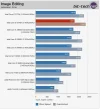
The Q6600 was a good CPU, but it's flagging now. The 3570K is under £180, and with performance like this in comparison with some of the bigger chips, it's a bargain
Also DELLs are a completely different form factor to the norm, they are their own. So you would not be able to reuse your case and therefore power supply either/
On the upgrade front:
I'd look at:
Asus P8Z77-V
Intel Core i5-3570K 3.4Ghz
Corsair Vengeance 16GB (2x8GB) DDR3 PC3-12800C10 1600MHz
The Q6600 was a good CPU, but it's flagging now. The 3570K is under £180, and with performance like this in comparison with some of the bigger chips, it's a bargain
Last edited:
Similar threads


- Replies
- 0
- Views
- 2K
- Replies
- 27
- Views
- 15K
