ClioSport.net

This is a sample guest message. Register a free account today to become a member! Once signed in, you'll be able to participate on this site by adding your own topics and posts, as well as connect with other members through your own private inbox!

  • When you purchase through links on our site, we may earn an affiliate commission. Read more here.

The Power PC Thread [f*ck off consoles]

For most people, I think so,
Getting 120+fps in 4K with good graphics setting requires some pretty expensive hardware, however you can run 120fps in 1440p with ultra settings for a far more modest budget, and it's a big leap in both resolution and graphics from previous gen consoles.
You can see in the graphs above that even thought the 6800XT is ahead in 4k. It's not hitting 120FPS on all games.

6900XT or 3090 will be required for 4k gaming. £1000-1500... as you say 1440p is much more achievable on a budget.
 
I got a new 1440p monitor this year and see no need to update it for a long time to come.
Yea that's my get out of jail with my lads PC, his monitor is 1440p and his current 2060 will run 1440 @ 120fps, so no point in him upgrading his GPU, just hope he is happy with his Asus Rog B550 MB and 5800x CPU.
 
Yea that's my get out of jail with my lads PC, his monitor is 1440p and his current 2060 will run 1440 @ 120fps, so no point in him upgrading his GPU, just hope he is happy with his Asus Rog B550 MB and 5800x CPU.
As I understand it, if you've got Zen 3 as well, you get the extra 5-15% boost from SAM which makes it even more convincing.
 
I think that's only with the X570 boards.
I think B550s are included too:


"Currently, AMD Smart Access Memory is a feature for systems with AMD Ryzen 5000 Series processors, AMD B550 and X570 motherboards and Radeon RX 6000 Series graphics cards. There are no technical limitations to support SAM on other platforms, other than supporting certain features that are part of PCIe and firmware standards. SAM leverages the AMD device's resizable BAR feature and has been validated. We also tuned the driver to deliver optimal game performance with Ryzen 5000 Series processors and Radeon RX 6000 Series graphics cards. We're excited to show how it will improve PC gaming."
 
It's here 😊

C29C8449-6774-437C-BD1C-FED7BCB1C135.jpeg

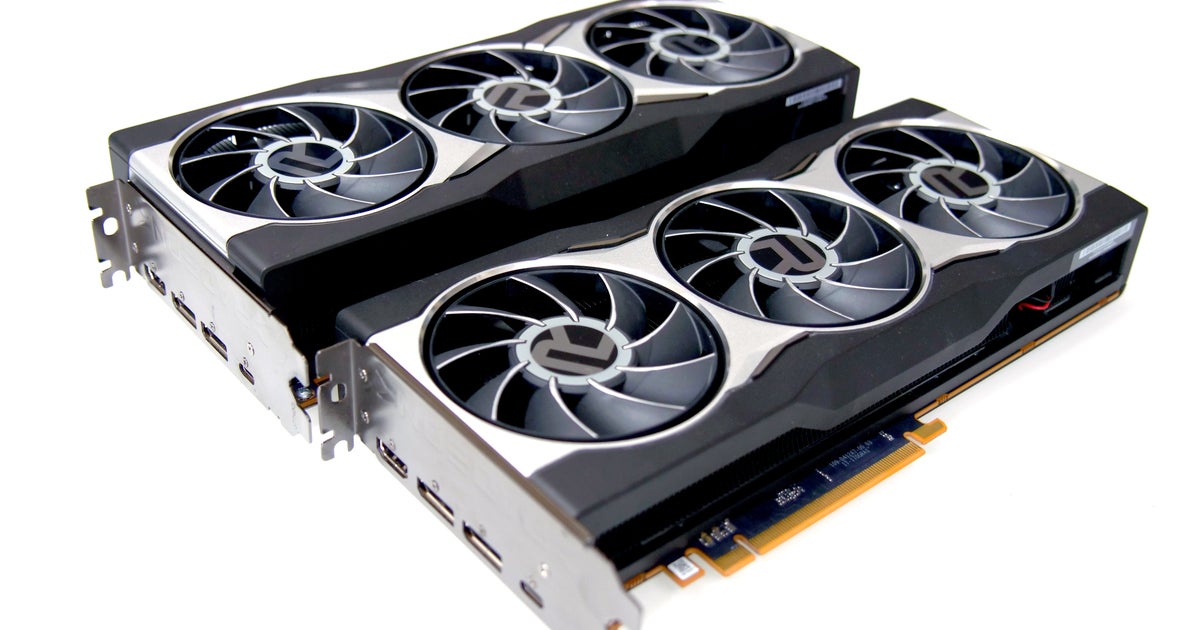
Not that much bigger than the outgoing gpu.
9602EC29-0E6E-4765-9B57-5BE1BFDF9171.jpeg
 
Last edited:
wanna larf......?
man runs with pc for 10-11 years, goes completely OTT with upgrade.
Man buys Corsair 115i 280mm cooler
But.....
Man has Fractal Design R2 case
where the *&$@!*& rad won't fit even though it has two 280mm fan spaces......
 
The clock frequency listed for a 3090 is 1395mhz, figure in brackets. The boost clock is 1.7, so what is the figure of 1.980 relating to? This is from 3D Mark.

E05825B8-DED9-4F95-A823-BC4AD7B18D52.jpeg
 
Guys, is electrical contact cleaner ok to use to clean the pc out tomorrow when i fit the boys new motherboard and processor, obviously i would only use a bit just to get shut of dust etc.
 
Guys, is electrical contact cleaner ok to use to clean the pc out tomorrow when i fit the boys new motherboard and processor, obviously i would only use a bit just to get shut of dust etc.
Scrub that, i know it's a bad idea, compressed air is the way go.... (y)
 
My brother bought a pre-built ACER gaming PC from Curry's ages ago. Came with a 9th gen 9400F and a 1060Ti but never ran mint. I told him to upgrade his CPU cooler and his RAM which made a difference but his CPU and GPU temps were still up at like 80⁰C under normal load.

Told him to f**k the fancy case off and get a 6 fan £50 case and I'll swap everything over. Did it for him yesterday and now everything runs 40⁰C cooler!!!😳
 
My brother bought a pre-built ACER gaming PC from Curry's ages ago. Came with a 9th gen 9400F and a 1060Ti but never ran mint. I told him to upgrade his CPU cooler and his RAM which made a difference but his CPU and GPU temps were still up at like 80⁰C under normal load.

Told him to f**k the fancy case off and get a 6 fan £50 case and I'll swap everything over. Did it for him yesterday and now everything runs 40⁰C cooler!!!😳

Was the original case still in its packaging something? 😂

A bloke at work keeps saying about a £800 gaming PC he's bought for his lad that keeps blue screening. I just pretend to not hear him because I'm not getting involved in any of that!

Why are pre-builts so bad still?!
 
Was the original case still in its packaging something? 😂

A bloke at work keeps saying about a £800 gaming PC he's bought for his lad that keeps blue screening. I just pretend to not hear him because I'm not getting involved in any of that!

Why are pre-builts so bad still?!
Nah it just had 1 80mm exhaust fan in the whole f**king case!!😂

I did tell him to save his money and I would have built him a PC but you know how people are these days. Finance and a year without paying anything and he was all over it 🤦‍♂️

Fast forward less than a year and he's already had to buy a new mobo, cpu cooler, RAM, case and case fan header
 
Nah it just had 1 80mm exhaust fan in the whole f**king case!!😂

I did tell him to save his money and I would have built him a PC but you know how people are these days. Finance and a year without paying anything and he was all over it 🤦‍♂️

Fast forward less than a year and he's already had to buy a new mobo, cpu cooler, RAM, case and case fan header

He's loving the pre-built life then 😂
 
That’s something which was better in the old days. Put in a disc. Play. Game saves stored locally etc.

Now you need 407 different game launchers from all the diffferent publishers. Steam, origin, uplay, battlelog, whatever the blizzard one is... leaves your program files & start menu folder in a right mess not to mention needing yet more passwords, more emails about updates to T&Cs or wanting the date of my first sneeze for 9 factor authentication.
I disagree. Play game with disc, lose disc or pc dies and it’s a pain in the arse.

Riot games really need a launcher though, it’s becoming a pain with all the different individual game installs.
 
Well finally got it done, massive thanks to @Rojer , boss as always mate, 6 hours, dont flame me, first time, so rookie mistakes and some gut wrenching thought i had snapped the gpu, but its done....thank f**k, give me cars anyday.
20201122_163305.jpg
 
Thinking about this PSU to support the 3080 if stock ever appears. I've already got a 650W Superflower so should be able to use the same cables without rewiring with the bonus of having spare ones.

 
My ram RGB keeps changing to a solid red. Thought it may be a temp warning or something but its not. Reddit seems to say just re install iCue and itll be fine. I did that yesterday and all was good until just now. Any ideas? iCue is up to date as is the firmware.

Also, is there a way to save my power/display settings on windows? Every time I turn pc on the power settings seem to have returned to default. Main issue is on default the monitor goes to sleep after 15/30mins, which then means the PC goes to sleep too. Not ideal for downloading.
 
Have you tried going into BIOS and controlling your RGB in there? As for power settings turn off fast startup as they sometimes f***s settings up
I havent went into bios since I built it, the general consensus seemed to be that the display port cable only accepts a certain resolution, so when bios tried to launch ever since, i just got a 'display port no signal' message (i used hdmi when i first built it). I need to get another DP cable, just need to research what type i need. How do i turn off fast startup?
 
Download Dragon Center for the motherboard and make sure it's not overwriting iCue.
I already have this. I keep having to turn it to 'silent' as the fans are pretty loud, lol. How do i check its not overwriting iCue?

It's been spot on for the last week, just the last couple of days have been odd with the ram changing colour.
 
I havent went into bios since I built it, the general consensus seemed to be that the display port cable only accepts a certain resolution, so when bios tried to launch ever since, i just got a 'display port no signal' message (i used hdmi when i first built it). I need to get another DP cable, just need to research what type i need. How do i turn off fast startup?
Aye just use a 2nd monitor with HDMI into your graphics card.

Power and sleep settings, advanced power settings, choose what power button does, shutdown settings and then it should be on there iirc
 
I havent went into bios since I built it, the general consensus seemed to be that the display port cable only accepts a certain resolution, so when bios tried to launch ever since, i just got a 'display port no signal' message (i used hdmi when i first built it). I need to get another DP cable, just need to research what type i need. How do i turn off fast startup?
Display port works fine in the Bios mate, i was messing in bios before and use DP..👍
 
I already have this. I keep having to turn it to 'silent' as the fans are pretty loud, lol. How do i check its not overwriting iCue?

It's been spot on for the last week, just the last couple of days have been odd with the ram changing colour.

I never Use any of their shitty profiles just go custom.

There is a tab that controls the RGB, if needs be I can turn mine on to get pics.
 
Aye just use a 2nd monitor with HDMI into your graphics card.

Power and sleep settings, advanced power settings, choose what power button does, shutdown settings and then it should be on there iirc
Ok cool cheers
Display port works fine in the Bios mate, i was messing in bios before and use DP..👍
Seems to be hit and miss with the cables apparently. Mine wont have it
I never Use any of their shitty profiles just go custom.

There is a tab that controls the RGB, if needs be I can turn mine on to get pics.
No rush mate but next time you boot it up a few pics would be great, nice one.
 
Back
Top