ClioSport.net

This is a sample guest message. Register a free account today to become a member! Once signed in, you'll be able to participate on this site by adding your own topics and posts, as well as connect with other members through your own private inbox!

  • When you purchase through links on our site, we may earn an affiliate commission. Read more here.

Mesh Wi-fi

I'm assuming plenty of you have experience with this?
I've got a few Wi-fi black spots in my house, namely my downstairs toilet and 4th bedroom. My wife has just made the 4th bedroom her office so I need a solution.
I bought a Powerline adapter so she could be hard wired, but thought getting one that also did Wi-fi would be good as it would improve the coverage in that bedroom, however, when all connected all our devices were trying to use the Wi-fi from the extender rather than the normal router., giving us worse Wi-fi coverage than we had previously.

I need a solution, I'm assuming that needs to be a mesh, but I don't want an overkill solution for what isn't a massive issue. I just need to improve my Wi-fi coverage a bit, we don't do anything that needs super speeds. Is mesh the best option, and how easy is it to set up?
If it is the answer, any recommendations for the best kit?
 
I'm looking at buying a mesh wi-fi too. Not to sure whether I should go for a tri-band wi-fi 5 system or a dual-band wi-fi 6?
 
Bump. Currently going through extension, so ceilings and floors are exposed. What are the easiest/best options?
Can I just plug and play or are they just wifi? I’m talking absolutely basics
 
We have TP-Link deco S2 units and I really like them.

You need wired connection to your router for one unit then the rest are all just wifi so only need power. The setup couldn't have been more straightforward either and the app to control it all is superb.

Ie) I don't think there is much you need to do in ceilings/under floors apart from making sure you have a plug socket in the locations you want to place each of the boxes.

You could run an ethernet cable into each section of the house - then the wifi mesh node would connect to the main router directly which would improve speed, depends what you will end up using it for tbh.
 
As above, whilst things are ripped out run Ethernet where ever you can.

And do 2 cables runs to each spot if you can as well, means if you need it, or if there’s a fault on one of them you’ve got another already installed.
 
We have TP-Link deco S2 units and I really like them.

You need wired connection to your router for one unit then the rest are all just wifi so only need power. The setup couldn't have been more straightforward either and the app to control it all is superb.

Ie) I don't think there is much you need to do in ceilings/under floors apart from making sure you have a plug socket in the locations you want to place each of the boxes.

You could run an ethernet cable into each section of the house - then the wifi mesh node would connect to the main router directly which would improve speed, depends what you will end up using it for tbh.

sounds easy then. I won’t bother running Ethernet then. Can’t imagine I’m going to be setting up a pc or ps5 anytime soon with the nipper so WiFi shall do. Cheers
 
It is very easy with wifi and the mesh boxes. But while everything is exposed there's no hard chucking a few cables into rooms.

My broadband is 500mb/s. I get 200mb on WiFi at the far end of the house, 350mb near the first router but the full 500mb/s on wired.
 
With the Deco app you can setup a guest WiFi network so you don't have to give random visitors your password, then you can also block specific websites for certain devices. For example I block YouTube to my son's tablet but not to my pc.

Considering blocking all clothing websites from woman's phone but not sure I'm brave enough.
 
It is very easy with wifi and the mesh boxes. But while everything is exposed there's no hard chucking a few cables into rooms.

My broadband is 500mb/s. I get 200mb on WiFi at the far end of the house, 350mb near the first router but the full 500mb/s on wired.

think my max speed is 10mb😂
 
My current WiFi speed is 15mb and we are getting some rural fibre in the next few months. I currently use a Tenda Mesh, which occasionally drops out or the speed suddenly drops until I restart it. Potentially could be plusnet but not sure how to figure that out as its random and I've tried it without the Tenda but I lose coverage.

Is a mesh network on such a low speed actually worth it? I got it in lockdown so I could work in the kitchen which is a blackspot.


What's a reasonable mesh network to get around £100 For the impending fibre.
 
I got this when we moved into our new home as the router from NOW wasn't reaching everywhere in the house due to location of the incoming internet etc.

Mercusys AC1900 Whole Home Mesh Wi-Fi System, Coverage up to 6,000 ft² (550 m²), Connect over 100 Devices, Full Gigabit Ports, Dual Band Wi-Fi, Easy App Control, Halo H50G(3-pack) https://www.amazon.co.uk/dp/B09C7JDYJ1/?tag=cliospnet01-21

Not had an issue with it at all, it also sets up a guest network that you can provide a simple password on for friends if they pop in.
 
We’ve got the Orbi RBK953.
Full speed internets everywhere, absolutely cannot fault it.

Slightly more expensive than most though & I’m sure there’s products that’ll be good enough without the price tag.
 
I’ve had Eero installed for a couple of months now and I’ve had absolutely zero issues with it. Fast speeds throughout entire house. and had the signal drop out once.

Highly recommend

These are the speeds I’m getting connected to the upstairs wireless hub

8F36072E-D10F-428C-B672-A0D1C4B42C0D.jpeg
 
Hijacking a thread.

Just had Gigaclear rural broadband fitted.

The supplied router is huge and I want to use my Tp Link Deco M5 Mesh thingies as they spread the net around the house better.

Do they have to connect to the router or can they go straight to the wall.

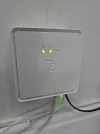
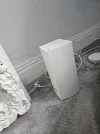
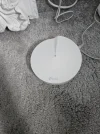
Picture of wall socket and giant router.
 
Hijacking a thread.

Just had Gigaclear rural broadband fitted.

The supplied router is huge and I want to use my Tp Link Deco M5 Mesh thingies as they spread the net around the house better.

Do they have to connect to the router or can they go straight to the wall.

Picture of wall socket and giant router.
 

Attachments

  • 20230815_183203.jpg
    20230815_183203.jpg
    1.7 MB · Views: 277
  • 20230815_183218.jpg
    20230815_183218.jpg
    1.9 MB · Views: 227
  • 16921212570811153047177084844836.jpg
    16921212570811153047177084844836.jpg
    2 MB · Views: 224
If you're removing theirs, you'll need to login info, I haven't checked but I presume it's PPPoE
 
Last edited:
The box on the wall is known as an ONT, this doesn't provide any account level information.
Your (their) router will probably have it - so if you replace it, you need
a) the details
b) a router that supports that protocol

Im not familiar with gigaqueer, I trust they gave you the router admin login?
 
Thank you


My bad its done by a company called Airband.

It is PPPOE

I think my deco would work I just need the account details.

 
Give them a call, they are usually generic details oddly.
My isps is a terrible cliche about being fast
 
  • Like
Reactions: riz
OK thank you.

When I get the details from my isp and Ill use that on the TP.

From memory there a few options on the tp link to connect it to the ont. Would that ppoe again?
 
from memory, you should be able to set the pppoe details on the TP, and then it'll authenticate just fine. It certainly won't be too problematic, mine is like so:

1692128874707.png
 
Thank you

I've gone from 12mb Internet to 270mb.

Just a shame it doesn't broadcast anywhere until this mesh is sorted
 
All sorted, thanks for the help.

Shame my mesh projects my wifi excellently over the front garden but not so much in the rear. Will have to find another deco to add
 
I can get mine 80m out the front, but only 30m out the back.
As I live on a new build development that's still a good distance outside my property!

I run a router and 2 satellites, the Orbi RBK953.
 
  • Like
Reactions: riz
I need one of these for my gaff but no idea where to start, my current BB is shite though, only like 8mb. Is there any point me getting one?
 
I need one of these for my gaff but no idea where to start, my current BB is shite though, only like 8mb. Is there any point me getting one?
Obviously these won't help with your slow BB, but will give you a better wifi coverage throughout your property if it's currently not very good, so will probably give you a better overall experience.

Do a speed test next to your ISPs router & then different places in your property & see what the difference in speed is.. you'll probably see less than the 8Mbps the further you go, (or maybe see more when right up close to the router depending on where you have tested)

Might give you an idea on whether it's worth spending out on these for your situation
 
We've got really thick interior stone walls and went with:

3 x TP-Link EAP225s (https://www.tp-link.com/uk/business-networking/omada-sdn-access-point/eap225/)
and an Omada OC200 controller (https://www.tp-link.com/uk/business-networking/omada-sdn-controller/oc200/)

We've got them running off wired ethernet but they support full mesh operation as well and they're pretty quick to set up.

Still some slightly flakey spots in odd rooms, but overall pretty decent.

Are you still running this setup? Does the controller add any value on a small network?

I've just bought an Omada poe switch, four EAP653 acces points and going to add an AC1200 outdoor AP for the garden but unsure what the controller adds on such a small setup?
 
Are you still running this setup? Does the controller add any value on a small network?

I've just bought an Omada poe switch, four EAP653 acces points and going to add an AC1200 outdoor AP for the garden but unsure what the controller adds on such a small setup?
I have a similar setup.
But the controller is mad good, allows cloud management for free technically. Handy for all my customers too.
 
Are you still running this setup? Does the controller add any value on a small network?

I've just bought an Omada poe switch, four EAP653 acces points and going to add an AC1200 outdoor AP for the garden but unsure what the controller adds on such a small setup?
Ultimately, f**k knows.

I've spent a while buggering about in the site configuration and using the "AI Tuning" to optimise channel selection, transmit power, channel width etc., but I've never been diligent enough to properly A/B test it to figure out if it's improving things.

I do still get dropouts on my phone moving around the house and find there are sometimes delays of a second or two while it reconnects to the stronger AP but that's at least in part due to the thick walls still, and possibly down to my (relatively) old phone (Pixel 6 Pro).

Recently added a new EAP650 which was pretty easy with the controller and that's definitely improved bandwidth in certain rooms and for what we use it for, it's always sufficiently fast.
 
  • Like
Reactions: MLB
Back
Top